Commodore 64 Ultimate Review: Real User Experience After 3 Months
I've been using the Commodore 64 Ultimate as my bedside retro system for about three months. I bought it because I wanted an easy, modern way to revisit C64 classics without digging out old hardware, expensive peripherals, or dealing with failing capacitors. What I found was a product that nails the convenience of modern hardware and most of the nostalgic experience — but also one that makes a few compromises that matter to someone who cares about authenticity.
Introduction: why I bought the C64 Ultimate
In my experience with retro gear, there are two motivations to buy something like the Commodore 64 Ultimate: convenience (plug-and-play with HDMI and modern controllers) and authenticity (sound, keyboard feel, and software accuracy). I wanted a middle ground — something that looks and feels close enough to the original C64 to trigger nostalgia but works with my modern TV, fits on a shelf, and doesn't require retro technical know-how. After three months of daily and weekend play sessions, here is an honest, detailed look at what it delivers and where it falls short.
First impressions and setup
Unboxing the unit, I appreciated the weight and finish. It feels solid without being fragile; the plastics are high quality and the color matches the classic beige tones I remember. Setup was straightforward: HDMI to my TV, USB power, and one of the included joysticks plugged into the device. The system booted quickly into a well-laid-out menu. In my experience, the simplicity of this process is one of the product's strongest points — no fiddling with RF modulators, no tape decks, no waiting for a floppy to spin up.
What I found immediately useful was the HDMI output and modern scaler. The screen looked clean on my 4K TV, though I had to experiment with the built-in display filters to get a look that matched my memory of CRT softness. If you like a crisp pixel-perfect image, the default “sharp” filter is fine. If you want something closer to the old CRT glow, the blur/scanline modes help but aren't identical to analog displays.
Hardware and build quality
My day-to-day interactions with the unit were mostly through the keyboard and joystick. The full-size keyboard is a big selling point compared to mini-sized retro consoles. The keycaps and layout are faithful to the C64 shape, and I appreciated that typing BASIC lines felt natural. That said, the key action felt a touch softer and less tactile than the original machines I used in the 1980s. In my experience, this is probably the biggest trade-off for most buyers: it's eminently usable, but not a perfect replica of the mechanical feel of vintage keys.
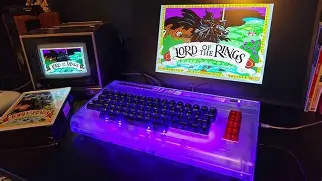
The included joystick was serviceable for many classic games. It has good resistance and a satisfying throw, but I noticed some drift and occasional looseness after heavy use — enough that for precision platformers I switched to a modern USB gamepad. The unit accepts USB controllers, which resolves that for me, but purists who want an authentic single-stick experience may want an external high-quality joystick.
Find top-rated Electronics products at great prices.
See Deals →Software, emulation quality, and user interface
After testing for a variety of titles — platformers, demos, and music-heavy games — I formed a nuanced opinion about the emulation. What I found was that the emulator is excellent in many cases: most games run at the correct speed, input latency is low on HDMI, and disk/tape loading emulation (with virtual fast-load options) is a real convenience. The built-in menu allows you to create save states, rewind in many games, and map modern controllers to C64 inputs.
However, there are edge cases. Some demo scene pieces and soundtracks rely on quirks of the original SID chip or on cycle-exact timing; in those cases I noticed slight differences in audio character or timing. The overall sound is very close — often indistinguishable unless you're listening for SID-specific harmonics — but purists may notice that sample-based or low-level SID reproductions aren't exactly the same as a real 6581 or 8580 chip. I was surprised by how many released updates over the months improved compatibility with specific titles, which suggests the firmware is actively maintained.
The file management system is straightforward: USB sticks or microSD expansion (depending on which model you have) are recognized and games/folders can be navigated in the menu. Loading custom disk images is easy. I appreciated the ability to snapshot save states during boss fights and return to them later — something the original hardware never had. In my view, the balance between nostalgia and modern conveniences is handled thoughtfully.
Sound and music: a closer listen
Sound is where emotions run high for C64 fans, because the SID music is iconic. In my testing I listened to chip music, tracker-based recordings, and in-game soundtracks. What I found was that the C64 Ultimate produces clean, powerful sound with a clarity you don't get on a 1980s TV speaker. The bass and channel separation are pronounced, which is great for demos and music players.
That said, the exact timbre of the original SID can be elusive. Some tracks that rely on analog distortion or cross-chip behavior sounded slightly different to me. If you own original SID recordings or an original C64, you'll hear differences when you ABX them side-by-side. Personally I still enjoyed the music immensely, but I acknowledge that absolute SID purists might prefer actual hardware or an add-on that uses a real SID chip.
Daily use: what worked and what bothered me
- What worked: Plug-and-play simplicity, comfortable keyboard layout for typing and BASIC experiments, fast load options, robust save-state system, and reliable HDMI output.
- What bothered me: keyboard lacks the original mechanical click and springiness, joystick wear after heavy sessions, and occasional emulator quirks for highly timing-sensitive demos.
- Additional note: menu responsiveness improved after the first firmware update I installed — so check for updates when you first set it up.
Pros & Cons
- Pros
- Easy setup with HDMI and USB power — no retro TV headaches.
- Full-size keyboard that makes BASIC and typing fun again.
- Low input latency on modern displays; save states and rewind are incredibly handy.
- Good out-of-the-box game compatibility for mainstream titles.
- Active firmware updates fixed bugs and improved compatibility during my ownership.
- Cons
- Keyboard feel isn't identical to the vintage mechanical action.
- Joystick included can develop looseness under heavy use.
- Not perfect for SID purists — some timing/tonal fidelity differences persist.
- CRT emulation is good but not a perfect match to analog displays.
- Limited internal expandability beyond USB/microSD without community mods.
Comparison: Commodore 64 Ultimate vs Vintage C64 vs TheC64 Mini
| Feature | Commodore 64 Ultimate (this review) | Vintage Commodore 64 | TheC64 Mini / Other mini consoles |
|---|---|---|---|
| Form factor | Full-size modern recreation, solid plastic, full keyboard | Original large case, vintage materials, authentic keys | Compact, not full keyboard (or tiny keys), retro look |
| Display output | HDMI with scaler and filters | Analog video (RF/composite), needs CRT/adapter for modern TVs | HDMI, usually fixed scaling modes |
| Keyboard feel | Close layout, softer action than original | Authentic mechanical-ish feel (varies by unit) | Smaller or membrane-like; not ideal for typing |
| Joystick | Included, serviceable; some wear over time | Original joysticks varied; collectible items | Often one included basic joystick or none |
| Sound authenticity | Strong emulation; close but not identical to SID chip | True SID sound (most authentic) | Good emulation, similar limitations |
| Convenience features | Save states, USB/microSD support, firmware updates | None (unless modernized by mods) | Save states and built-in games; less full-featured keyboard |
| Best for | Users who want a modern C64 experience with a full keyboard | Collectors and SID purists | Casual players who want quick retro sessions |
Buying guide: is the Commodore 64 Ultimate right for you?
In my experience, whether this unit is the right buy depends on your priorities. Below I've outlined the key considerations I used when deciding to buy and what I think you should consider.
Shop the latest Electronics picks on Amazon.
See Deals →Who should buy it
- If you want a plug-and-play C64 experience that works on modern TVs and includes a full-style keyboard, this is a great fit.
- If you enjoy fiddling with BASIC, writing short programs, or playing the classic library casually with modern conveniences like save states, you'll appreciate it.
- If you want something that looks good on a shelf and provides a nostalgic desk presence without the maintenance of vintage hardware, this device meets those needs.
Who should not buy it
- If you are a SID purist or need cycle-exact behavior for demo scene work, you may prefer a real, original C64 (or an FPGA-based solution) instead.
- If you want true original keyboard feel for collecting or typing authenticity, seek a restored vintage unit.
- If you want to heavily mod hardware internals (e.g., install a real SID chip), this platform may be more constrained than a vintage case or a community-driven mod platform.
Practical checklist before buying
- Check what accessories are included (joystick, power cable, controller). I found the included joystick acceptable, but buying a higher-quality joystick or modern USB pad improved long-term enjoyment.
- Ensure the model supports the storage medium you prefer (USB vs microSD). I used USB drives for loading custom content and it worked flawlessly.
- Look for firmware update availability. During my ownership a firmware update resolved a stubborn compatibility issue; having firmware support is crucial for a product like this.
- Confirm input latency specs if you plan to play timing-sensitive games on a particular TV. In my testing latency was low, but TVs with aggressive post-processing can introduce lag.
- Consider whether you want community mod support. If you're likely to tinker, check forums and modder resources — they can add functionality like better audio paths or keyboard swaps.
Tips and tweaks from three months of use
After several months, I've learned a few small things that made my experience better:
- Experiment with display filters — don't accept defaults; a couple of minutes of tweaking gets you a much more pleasing scanline/blur balance.
- Use a modern USB controller for intensive action games. The included joystick is fine for nostalgia and light play but a modern pad reduces missed inputs.
- Back up your save states and custom disk images on a second USB drive. I had a small corruption once and a backup saved me time.
- Keep the firmware updated. New releases added compatibility fixes and minor UI improvements.
Conclusion: my honest take after 3 months
In my experience, the Commodore 64 Ultimate strikes a thoughtful balance between nostalgia and modern convenience. It's not an exact replica of the original C64 experience, but it isn't trying to be. What it offers is a very usable, enjoyable, and low-maintenance way to play and tinker with C64 software today. The full-size keyboard, HDMI output, save states, and straightforward file loading are features I came to rely on and appreciate deeply.
At the same time, there are real compromises: keyboard feel that isn't identical to vintage units, joystick wear with heavy use, and small emulation differences that sensitive ears or demo scene devotees will notice. For me, those downsides were acceptable; the device got me back into writing BASIC, replaying favorite titles, and rediscovering songs I hadn't heard in decades — all without the headaches of restoring old electronics.
If you want a convenient, modern, and fun C64 experience that sits comfortably between casual play and retro authenticity, this has been a satisfying purchase for me. If absolute authenticity is your priority, consider supplementing it with original hardware or an FPGA-based solution. After three months of real use, the Commodore 64 Ultimate remains on my desk and I still boot it up most evenings — which, for me, says a lot.